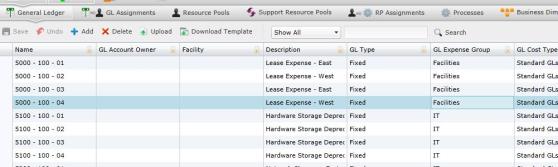
General ledger accounts store all company expenses and their related data, including cost type, the facility directly responsible for the account, and the account owner. PA5G also allows you to customize the accounts with attributes unique to your company. These attributes could have been added during the initial database migration (during Configuration), or by selecting the Model>Attributes>Entity Attributes tab.
Selecting the General Ledger Accounts panel on the Start screen will navigate you to the General Ledger Accounts screen.
To add a general ledger account manually:
Select  . A new row will appear in the table.
Type the new general ledger account and its data inside the fields. Along with any customized attributes added during initial database configuration, the General Ledger table contains the following columns:
Name: Name given to the general ledger account.
GL Account Owner: Person responsible for the account.
Facility: The facility where the account originated.
Description: A brief description of the account.
GL Type: Type of general ledger account. (Fixed or Variable)
GL Expense Group: The group that receives compensation from the account.
GL Cost Type: Type of general ledger cost.
You can also add other attributes by navigating to Model>Attributes>Entity Attributes. See Creating Attributes for more details.
Select  to save the new general ledger account.
To upload files:
Select  . A download pop-up screen will appear. Make your selections and select "OK."
Open the data template and confirm that the columns and the presentation of data is identical to your records.
Select  . The "Upload" panel will open.
Drag and drop files to the grayed area, or select "Browse Upload."
Select .
What if the records fail to upload?See Edit Failed Records.
Select  at any time to delete any changes you have made. Select
  to delete an entire general ledger account.
Related Topics:
Introduction to Business Rules
General Ledger to Resource Pool Assignments
Resource Pool to Resource Pool Assignments